A system built for staying connected, not just getting online
Changing Lanes’ latest RV internet system is really a lesson in redundancy. The point is not simply to get fast internet in the new Grand Design Momentum 395MT, but to keep internet alive when one connection is weak, blocked, or unavailable. That matters most for remote work, video uploads, Zoom calls, live streams, and any situation where a dropped connection turns into a real problem.
The video makes that point early: this is version 6.0 of a mobile setup the creators have been refining since they first hit the road in 2017. Instead of spending time on a general mobile internet primer, the focus is on what changed, why it changed, and how the whole system is built to stay flexible.
The core hardware behind the setup
At the center of the system is the Peplink MAX BR2 Pro router. In the video, that router does the heavy lifting because it supports two built-in 5G cellular modems, multiple LAN ports, multiple WAN options, Wi-Fi connectivity, and Peplink’s SpeedFusion bonding. That combination is what turns a collection of separate internet sources into a more resilient whole.
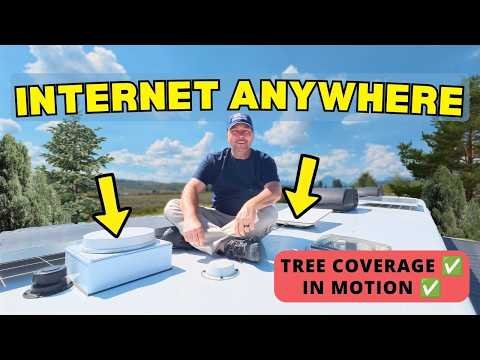
The router is tied to a Parsec Great Pyrenees 11-in-1 roof antenna, which brings together the cellular, Wi-Fi, and GPS elements needed for a roof-mounted mobile setup. The creators also keep Starlink in the mix, using a Gen 2 High-Performance dish that they moved over from the previous RV. That dish is described as the larger Starlink option, with a wider field of view and a better chance of maintaining service when trees, buildings, or other obstructions get in the way.
Inside the cabinet, the supporting cast matters too. A NETGEAR eight-port switch handles the network distribution, especially because the router’s built-in ports are not enough for everything in the RV. Two Peplink AP AX1 Lite access points provide internal Wi-Fi coverage. A Synology NAS stores their working video files. A UPS helps keep the system running through clean power and brief interruptions.
That’s the real shape of the build: not one gadget, but a networked system designed to keep the RV online and productive.
Why the roof install was designed around flexibility
The most interesting part of the episode is not the drilling itself. It is the way the creators think about future use before the first hole is made. The roof install begins with a 12-by-12-by-4 junction box that serves as a mounting and routing point for the Parsec antenna and the Starlink pass-through setup. The box gives them a platform, some extra room for cable management, and a way to keep the installation modular instead of fixed in one place forever.
That flexibility is intentional. In previous builds, the cable routing was more direct, but that also made the system less adaptable. This time, the junction box and waterproof connectors create options. If the Starlink dish needs to move to a different spot on the roof, or even away from the RV entirely, the system can be reconfigured without starting from scratch.
That is a practical answer to real travel problems. Roof obstructions are not always predictable. Campgrounds are not always open. Trees do not care what plan you had before arrival.
How the cable pass-through preserves future options
The video spends time on a detail that could easily be overlooked: the proprietary Starlink cable and how it gets adapted to the RV’s network layout. Because the Starlink cabling is not just ordinary Ethernet, the creators had to work through the connector challenge and use the right RJ-45 parts to make the modified cable sections work.
That mattered because the goal was not just to connect the dish once. The goal was to make the system movable. By using waterproof junctions and a separate blue Ethernet section running down into the cabinet, the setup can function like a configurable extension. If the dish has to be placed somewhere else, the cable path can be changed without redoing the whole roof install.
This is where the feature of the build becomes clear. The hardware choices are about preserving options later. The roof box is not only a mounting point; it is a way to keep the RV from becoming locked into one internet layout.
Why cellular still matters when Starlink is the main plan
Starlink is the primary connection, but the video is careful not to treat it as the only answer. Cellular remains part of the system for three reasons the creators spell out clearly: tree cover, redundancy, and upload performance.
If the RV is parked in a campground with dense trees, Starlink may not have the clean sky view it needs. Cellular fills that gap. If the internet is needed for something that cannot fail, SpeedFusion can bind multiple connections together so one outage does not take everything down. And if there is a big upload waiting — especially video files being moved from the NAS to Dropbox — multiple connections can help push more data upstream than Starlink alone can provide.
The numbers in the video make that usage pattern feel concrete. The creators mention that their upload load has already reached more than 10 terabytes over a few months on the road. That explains why they care so much about bandwidth in both directions, not just download speed.
The data plans are part of the design
The setup is only as useful as the plans behind it, and this is another place where the video stays practical. For Starlink, they use the Roam Unlimited plan because their use case goes well beyond a light occasional connection.
On the cellular side, the setup has narrowed to two plans. One is a truly unlimited T-Mobile-based plan through the Calyx Institute. The other is a Verizon-based unlimited plan from MobileMustHave that can be activated month by month when needed. That monthly flexibility matches the rest of the system: don’t overcommit when travel conditions change constantly.
What stands out here is how the plans are selected to fit usage rather than abstract theory. The creators are not trying to collect every possible carrier. They are choosing the ones that cover their real travel and work needs.
What a simpler RV internet system can look like
The video does a good job of avoiding the trap of presenting this as the only sensible answer. It is clearly a robust, higher-end setup, but the creators also point to simpler options.
If someone wants some of the same flexibility at a lower cost, a Peplink MAX BR1 can cover a more modest need. It has fewer cellular and WAN capabilities than the BR2 Pro, but it still offers a useful balance of connection options.
If the goal is even simpler, Starlink alone may be enough for many travelers, especially if the main need is streaming and general use rather than constant failover. And for those who do want cellular plus Starlink, but not the full redundancy stack, the video suggests a middle ground rather than pushing everyone toward the most complex build.
That honesty is useful. Not every RV internet system needs to be engineered like a remote production office. But if work, uploads, and uninterrupted calls matter, the system in this video shows how to think about the problem: start with what has to keep working, then build around that.
Watch the original video: https://www.youtube.com/watch?v=Qo2V59R3tfE
RECOMMENDATIONS
All About The Life designs from Texas Thread Theory, inspired by the places you go and the stories you bring back.

All About The Life Adventure RV Badge
A vintage All About The Life RV adventure badge featuring mountains, pine forests, lake scenery, a glowing sunset, and classic compass details. It’s made for RV travelers, campers, road trippers, and anyone who believes home can be wherever you park for the night.